A Starlink Mini buying checklist helps separate the cost of a kit from the decisions required to use it at the intended location. An attractive hardware offer does not answer every question about service availability, account setup, accessories or installation. Confirm those details before treating a listing as a complete connectivity solution.
Start with current JAAT internet and networking listings, then verify current service requirements directly with Starlink. This guide provides buyer questions rather than a fixed package price or speed guarantee. Call 0725345345 for help finding relevant listings and discussing seller information.
1. Define where and how you intend to use it
Write down the intended location and whether the proposed use is fixed, occasional or mobile. Ask Starlink which current service arrangement permits that use. Do not assume that a portable-looking product means every plan allows every location or travel situation.
Keep the location question separate from the seller’s stock location. A kit available from a shop does not establish service availability at your premises. Check the exact intended address and applicable terms through the official service before committing to hardware on the basis of a broad country-level claim.
Describe the tasks that matter to you, such as ordinary remote work, calls or access from a field office. Avoid translating those needs into an unsupported promise of a particular speed. The provider’s current service information and the practical site conditions should guide the evaluation.
2. Identify the exact kit in the offer
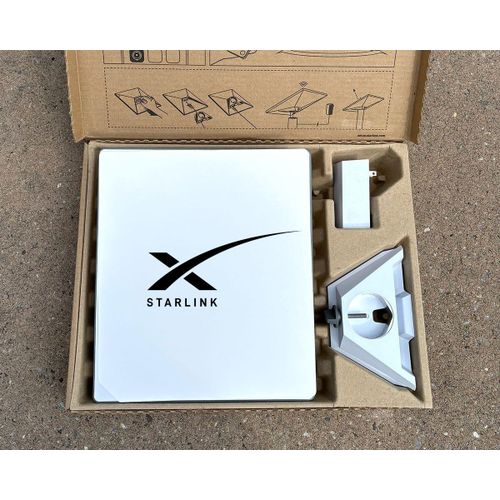
The Starlink Mini buying checklist should record the model, condition and included components. Ask whether the photographs show the actual kit or an example. Confirm the power supply, cables, mounting items and any other accessories explicitly rather than assuming that everything pictured is included.
If the seller offers several hardware generations or product types, keep their quotations separate. Similar brand names do not make the packages interchangeable. Ask for a written description of the exact unit and components you would receive at the stated price.
Where a listing does not state condition or warranty, treat that as a question requiring an answer. Do not infer that an unstated field means new, covered or ready for immediate activation. A useful offer should make those important details clear before the transaction progresses.
3. Confirm account and activation requirements
Ask how the specific kit will be associated with your own eligible account through Starlink’s current supported process. If the hardware has been used before, clarify any applicable transfer requirements directly with Starlink and the seller. Do not rely on an informal promise that an existing account can simply be shared indefinitely.
Keep credentials under the appropriate account holder’s control. An installer can explain the supported setup process without requiring you to publish passwords in a message thread. Confirm what assistance is included and which steps you must complete yourself through the official service.
Record the answer in the Starlink Mini buying checklist before paying. An unopened box, a serial label or a seller profile does not by itself prove that every activation condition is satisfied. Ask for the information the official process requires and resolve uncertainties in advance.
4. Check current service plans separately
Hardware and recurring service are separate parts of the decision. Review the current options, permitted use, billing arrangements and relevant limits directly with Starlink for your location. Do not select a service from an old screenshot or a package price repeated in an unrelated advertisement.
If the seller bundles assistance with hardware, ask whether any service payment is included and how it will be documented. Keep the equipment price, setup fee and recurring charge visible as separate lines. This helps you compare offers that otherwise appear similar but cover different work.
Consider the period over which you expect to use the service. A small upfront saving may be less important than understanding the ongoing arrangement and support responsibilities. Avoid treating the purchase as a complete long-term budget until the recurring terms are clear.
5. Review the intended installation location
Consult the official Starlink Mini setup guide for current product-specific instructions. Ask the installer to explain how the proposed position meets the requirements and how obstacles or practical limitations will be assessed.
Do not choose a mounting location solely because it is easy to reach or looks tidy. The site assessment should consider the equipment’s intended operation, safe access and the route for power and cables. Work requiring specialist access or electrical judgement should be handled by an appropriately qualified provider.
Keep a record of what the quote assumes. If the provider has not inspected the location, ask which items may change after a site visit. A provisional installation estimate should not be mistaken for a final commitment covering every possible mounting situation.
6. Confirm power and accessory compatibility
A Starlink Mini buying checklist should list the power arrangement and every proposed accessory by its exact identity. Ask the provider to use the current manufacturer guidance for compatibility. A connector that physically fits is not sufficient evidence that an unverified accessory is appropriate.
Separate included accessories from recommended purchases. Request an explanation of the problem each optional item solves. This makes it easier to decide whether a bundle supports your actual installation or simply adds equipment that the seller commonly supplies.
If you expect a portable or backup-power arrangement, describe that intention before the quote is finalised. Ask for a supported proposal and the relevant documentation rather than improvising a connection from unrelated adapters. The article does not establish compatibility for any particular third-party power device.
7. Compare the seller and installation provider
Use JAAT shops to inspect the hardware seller’s profile and JAAT businesses to review relevant service providers. Confirm whether the same organisation supplies and installs the kit or whether you will deal with separate parties.
Ask who handles a hardware issue, an installation issue and a service-account question. Those problems may follow different support routes. Keep the contacts and responsibilities clear so a later difficulty does not lead to each party assuming another organisation is responsible.
Review JAAT’s trust information and the actual checkout arrangement. Protected checkout applies only where it is offered; direct seller transactions have their own agreed terms. A listing’s presence on a marketplace does not establish universal coverage for every purchase.
8. Agree what the handover will demonstrate
Describe the ordinary tasks you want to observe after setup, within the provider’s agreed scope. Confirm that the correct kit and account arrangement are in use and that you receive the documentation and support information promised. Record any unresolved item rather than treating a brief connection as completion of every aspect of the work.
Avoid a guarantee based on one speed test or a short demonstration. A measurement describes a particular time and setup. Ask the provider to explain the limits of the acceptance test and what process applies if the installation does not meet the agreed scope.
The Starlink Mini buying checklist should also identify which instructions you need for normal operation and support. Use the official documentation and provider’s demonstrated steps. Do not rely on an undocumented workaround that nobody will be available to explain later.
9. Keep a complete purchase record
Retain the quote, agreed components, seller contact, payment record and applicable terms. Keep private account or device information out of public comments. If delivery is involved, agree how the package and contents will be checked and how a discrepancy should be reported.
Use JAAT county browsing to identify relevant local arrangements, then confirm the exact delivery or collection details directly. A broad service-area statement does not prove that all travel, installation or delivery charges are included.
Close the Starlink Mini buying checklist only when the hardware, service, account and setup questions are answered for your intended use. Call 0725345345 for help locating JAAT listings to compare, and confirm current service eligibility through Starlink before purchasing.
Starlink Mini buying checklist questions
Does buying the kit include a service subscription?
Check the exact offer. Do not assume that the hardware price includes recurring service. Confirm the current account and plan arrangements directly and request separate written lines for any bundled assistance or payment.
Can a seller guarantee service everywhere?
Use Starlink’s current location and service information for your intended use. A seller’s stock availability or delivery coverage is a different fact from the service conditions applying to a particular installation.
What should I do if a key detail is missing?
Pause the purchase decision and ask a specific question. An unstated condition, unclear transfer status or incomplete accessory list should become a documented answer before you rely on the offer.
Starlink mini buying checklist: a hardware-and-service comparison example
Imagine two fictional kit offers with different included accessories. Compare the actual components, condition and seller terms first, then assess the current service arrangement directly with Starlink for the intended location. Keep installation assistance on a separate line. This prevents a hardware bundle from being mistaken for a complete answer about account eligibility or recurring service.
Ask each seller to identify what remains your responsibility after delivery. That may include following the official account process or arranging a suitable installation assessment. Record the answer before comparing totals. The useful outcome is an understood sequence from purchase to supported setup, with open questions resolved by the appropriate party rather than passed between organisations later.
Related Kenyan websites and separate business tasks
Readers may also use other services for business, professional or personal projects. Keep each service’s purpose distinct from the transaction or recordkeeping task discussed here. A listing, software account or conversation on another website does not by itself establish a completed payment, an approved group decision or a supported connection between systems.
PRIM presents salon and spa management software, while Zama describes web portals and business systems. The Vega website is another business resource to review directly. When comparing tools, describe the task you need completed and ask the provider to demonstrate it using sample information. Confirm the current plan, support arrangement and any required setup before choosing a service.
JAAT provides a place to browse Kenyan shops, businesses, products and services. Dereva presents a driver marketplace. Confirm the current provider, location, scope and transaction terms for an individual listing. A public profile can help begin a discussion, but it does not replace checking what a specific offer includes or who is responsible for delivering it.
TAS focuses on organising chama administration. ZES presents attendance, access-control and security-related solutions. These are different tasks from comparing an ordinary retail listing or maintaining a group’s contribution record. Ask each provider about the exact intended use rather than assuming that a product name establishes compatibility with another service.
Saseni and Awasa are additional websites readers can review independently. Confirm availability and suitability directly before arranging work or sharing information. An external link is not evidence of an integration, endorsement of every listing or permission for another service to access private records.
Keep quotations, approvals and accounts associated with the task they actually support. If you propose connecting two services, obtain a clear explanation of the supported process, responsibilities and information involved. Use fictional examples for an initial demonstration and share only the information required through the appropriate approved channel. This makes it easier to compare providers without confusing separate business activities.
Use the starlink mini buying checklist worksheet before deciding
Create a short worksheet with the requirement, the seller’s answer, the evidence you observed and any question still open. Date the offer and identify the particular listing or unit. This keeps a change of model, condition or scope visible instead of allowing several different conversations to blend into one assumed agreement.
Apply the starlink mini buying checklist process consistently to each relevant offer. Ask the same essential questions, but allow sellers to explain genuine differences. A complete comparison can show that one offer is more suitable, that another requires clarification or that none currently meets the task. Each is a useful outcome before you commit to a purchase.
Before closing the starlink mini buying checklist worksheet, check the final total, included items, recipient, handover arrangement and support route. Keep conditions visible beside the answer they qualify. Do not mark an uncertain field as satisfactory merely because the seller has answered another question clearly or because the advertised price is attractive.
Retain the agreed offer and transaction record in an appropriate private location. If a problem occurs, explain the specific difference between the agreed description and what was received, using the relevant support process. Clear records make that conversation more precise without promising a particular outcome. Call 0725345345 for help finding relevant JAAT profiles and listings to compare.